Amazon GS1 Barcode Requirements: Complete 2026 Guide to Avoid Costly UPC Mistakes

If you want to list products on Amazon without future headaches, understanding Amazon’s GS1 barcode requirements is crucial.
If your head starts to spin when you hear GS1, GTIN and UPC, you’re in the right place. In this post, we’ll clarify Amazon’s rules so you can set everything up correctly the first time – and avoid the painful (sometimes impossible) fixes we’ve had to help clients navigate.
What is GS1?
GS1 is the global standards organization that issues official product identifiers – GTINs. Think of them as the single source of truth for product identification worldwide. They’re not a government agency, but a not-for-profit organization that creates and maintains the standards used throughout global supply chains.
What is a GTIN?
GTIN stands for global trade item number. It’s a unique number used to identify a trade item (product) anywhere in the world.
GTINs can be applied to any packaging level:
- Individual units (like a single bottle of shampoo)
- Packs (like a 3-pack of the same shampoo)
- Cases (what gets shipped to warehouses)
- Pallets (bulk shipments)
A GTIN can be encoded into a barcode so that all the pertinent information appears when scanned.
Any time you’re at a shop and hear that “beep” sound when the cashier passes a product over the counter, that’s GS1 at work – the barcode contains that identifying GTIN information.

Types of GTINs
Depending on your sales category, you might encounter or be familiar with a different type of GTIN. There are several types of GTINs:
- UPC (Universal Product Code): 12 digits, primarily used in the US and Canada
- EAN (European Article Number): 13 digits, standard in Europe and most other countries
- ISBN (International Standard Book Number): Used specifically for books
- JAN (Japanese Article Number): Used in Japan
- GTIN-8: 8 digits for small items
- GTIN-14: 14 digits for cases, pallets, or multipacks
For most Amazon sellers in the US, you’ll be working with UPCs (12-digit codes).
Amazon GS1 requirements: what you need to know
All products on Amazon must have a valid Amazon GS1 barcode for listing. This can be any GTIN -UPC, EAN, ISBN, or JAN – depending on the category and country.
Here’s where it gets critical:
Amazon checks all GTINs against the GS1 database. If the brand or company associated with the GTIN doesn’t match your seller account information, the code will be treated as invalid. This can result in:
- Listing suppression (your product disappears from search)
- ASIN creation blocks (you can’t create new listings)
- Account suspension (in severe cases)
- Loss of all reviews and sales history
GTIN exemptions: when you don’t need a barcode
Amazon does grant GTIN exemptions for specific cases and categories:
- Private label or handmade products – If you’re manufacturing your own items without barcodes
- Unbranded goods – Products sold under “Generic”
- Parts and accessories – Automotive parts, phone cases, etc. that don’t carry GTINs
- Custom bundles – Gift sets or multi-packs you create yourself (not factory-packaged)
Important: If your brand or product category already uses GS1 barcodes, you won’t qualify for an exemption.
The exemption process outlined on Amazon requires:
- Proof the product doesn’t have an existing GTIN
- Clear product images showing branded packaging without barcodes
- Brand name that exactly matches what’s on the product
- Category eligibility verification
However, we strongly recommend against relying on GTIN exemptions as a long-term strategy. They limit your ability to expand to other sales channels and can create complications if Amazon changes their exemption policies.
Amazon-safe barcodes: your options
A lot of new sellers don’t know about GS1. There are plenty of resellers and companies promising cheaper codes. This is almost always a red flag. GS1 is the only safe place to get an official product ID.
And it doesn’t have to be expensive. You have 2 options:
Option 1: purchase a single GS1 GTIN
- $30 one-time purchase, no annual renewal fees
- Perfect for sellers just dipping their toes in the market
- Ideal for testing a product before committing to larger barcode packages
- Each product variation needs its own GTIN

Option 2: GS1 company prefix
- $250 + annual renewal fees (pricing scales based on how many GTINs you need)
- Best for established brands that need to assign multiple GTINs
- Gives you a “company prefix” that identifies all your products as belonging to your brand
- You can create your own GTINs for new products
- Essential if you plan to sell in retail stores or on multiple marketplaces
Both options include free access to GS1 US Data Hub, a tool for managing your barcodes and product information.
Common mistakes that will cost you
Mistake #1: buying from third-party resellers
This is the most common and most costly mistake. Here’s what we’ve seen happen:
Real client example: One of our clients purchased UPC codes from a third-party reseller years ago. Their products were selling well, reviews were strong, everything seemed fine. They only realized this a few years later and wanted to pre-emptively fix the problem (yay!).
Amazon doesn’t notice every single GTIN or UPC code that’s incorrect, but they have bots perform checks which might then suddenly suppress these listings.
The problem? Once you create a product listing on Amazon, certain fields become locked – and the external product ID (your GTIN) is one of them. You can’t just swap it out for a new one.
With this client, we did manage to change some of the UPCs but there were some that got assigned completely new ASINs so some of their best sellers lost all their ranking and reviews.
Imagine spending months optimizing your product, gathering reviews, building sales velocity – then Amazon says “this UPC is invalid” and you can’t simply change it. All that hard work, potentially lost.
Mistake #2: using recycled UPCs
Third-party resellers often sell “recycled” UPCs – codes that were previously assigned to other products. When Amazon checks these against the GS1 database, they find:
- The UPC is already associated with a different product
- The brand doesn’t match your brand
- The company prefix belongs to someone else
Result? Instant listing suppression or serious issues.
We had one client use a recycled UPC for one of his products. Turns out that UPC had already been assigned to a product in the “adult category”. This meant a lot of tickets back and forth with Seller Support to finally fix the issue.
Mistake #3: Not verifying codes before using them
We’ve also had a client whose UPC code prefixes were registered to some other company – not theirs. They didn’t discover this until Amazon flagged it during a routine verification.
If this is you, we’ll show you further below how to fix this issue.
The fix (if you’re already in trouble)
If you’re already using non-GS1 codes, here’s what you need to do:
- Purchase legitimate GS1 codes for your products
- Create new listings with the correct GTINs (you’ll need new SKUs)
- Contact Amazon’s Catalog Team (not regular support) to request a listing merge
- Provide documentation: GS1 certificates, invoices, proof of brand ownership
- Be prepared to wait – this process can take several weeks
The merge process is complex and not guaranteed. Some sellers lose all their reviews and sales history in the transition but it beats losing everything all of a sudden.
Don’t let this be you; get it right from the start.
How to verify your barcodes are real
Anyone can check if a barcode is legitimate. Here’s how:
- Visit Verified by GS1
- Enter your barcode number/GTIN
- Complete the captcha
- Click search
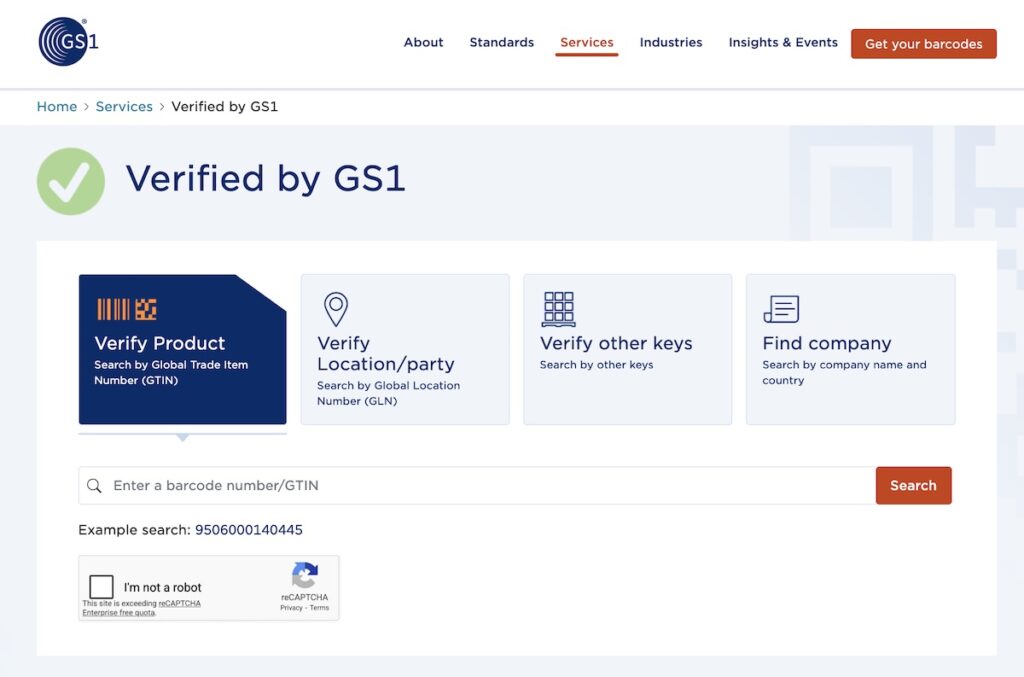
The results will show you:
- Company name – Who licensed the GTIN from GS1
- License information – Country where it was issued, status
- Product data (if available) – Brand name, description, image
If your company name doesn’t appear, or if someone else’s company is listed, you have a problem that needs immediate attention.
Pro tip: You can perform up to 30 free searches per day on the Verified by GS1 website. If you’re a GS1 member, you get access to more advanced features including API connections.
Why this matters more than you think
Beyond just Amazon compliance, legitimate GS1 barcodes:
- Work across ALL retail channels – Target, Walmart, brick-and-mortar stores, other marketplaces
- Are scannable worldwide – Modern scanners accept both UPCs and EANs
- Protect your brand identity – Your company prefix connects all your products to your brand
- Improve product discoverability – Google and other platforms use GTIN data
- Enable better inventory management – Throughout your entire supply chain
- Build customer trust – Proper identification reduces counterfeit concerns
Bottom line: just get the GTIN
We know $30 (or $250 for a company prefix) might seem like an unnecessary expense when you’re bootstrapping a business. But consider the alternative:
- Suppressed listings when you’re making sales
- Lost reviews and rankings
- Wasted time fighting with Amazon support
- Potential account suspension
- Having to rebrand and restart completely
We’ve seen it happen. We’ve helped clients try to fix it. It’s not worth the risk.
Trust us – just get the legitimate GTIN from GS1. It’s an investment in your business’s foundation, not an expense.
FAQ – frequently asked questions
Additional Resources
- GS1 Company Prefix Information: gs1us.org/upcs-barcodes-prefixes
- Verified by GS1 Lookup: gs1.org/services/verified-by-gs1
- Amazon UPC Requirements: Search “Product ID requirements” in Amazon Seller Central
- Video: GS1 and Small Business Success on Amazon
The final word: Getting legitimate GS1 barcodes isn’t just about Amazon compliance – it’s about building a business on a solid foundation. We’ve seen too many sellers try to cut corners here, only to face devastating consequences later. Don’t let a $30-250 investment prevent years of work from being destroyed.

Have questions?
We’ve helped dozens of clients navigate UPC issues and we’re here to help you avoid these costly mistakes.